
Mobile HUD Information Hierarchy: What to Show in Combat, Lobby, and Modals
HUD visibility and priority by game state; how it ties to Safe Area, floating text layers, and modal stacking—spec tables plus Play and device acceptance steps.
- game-ui-design
- game-dev-ai
- ui-to-engine
- hud
- mobile
- unity
- godot
- cocos
- vberai
- 2026
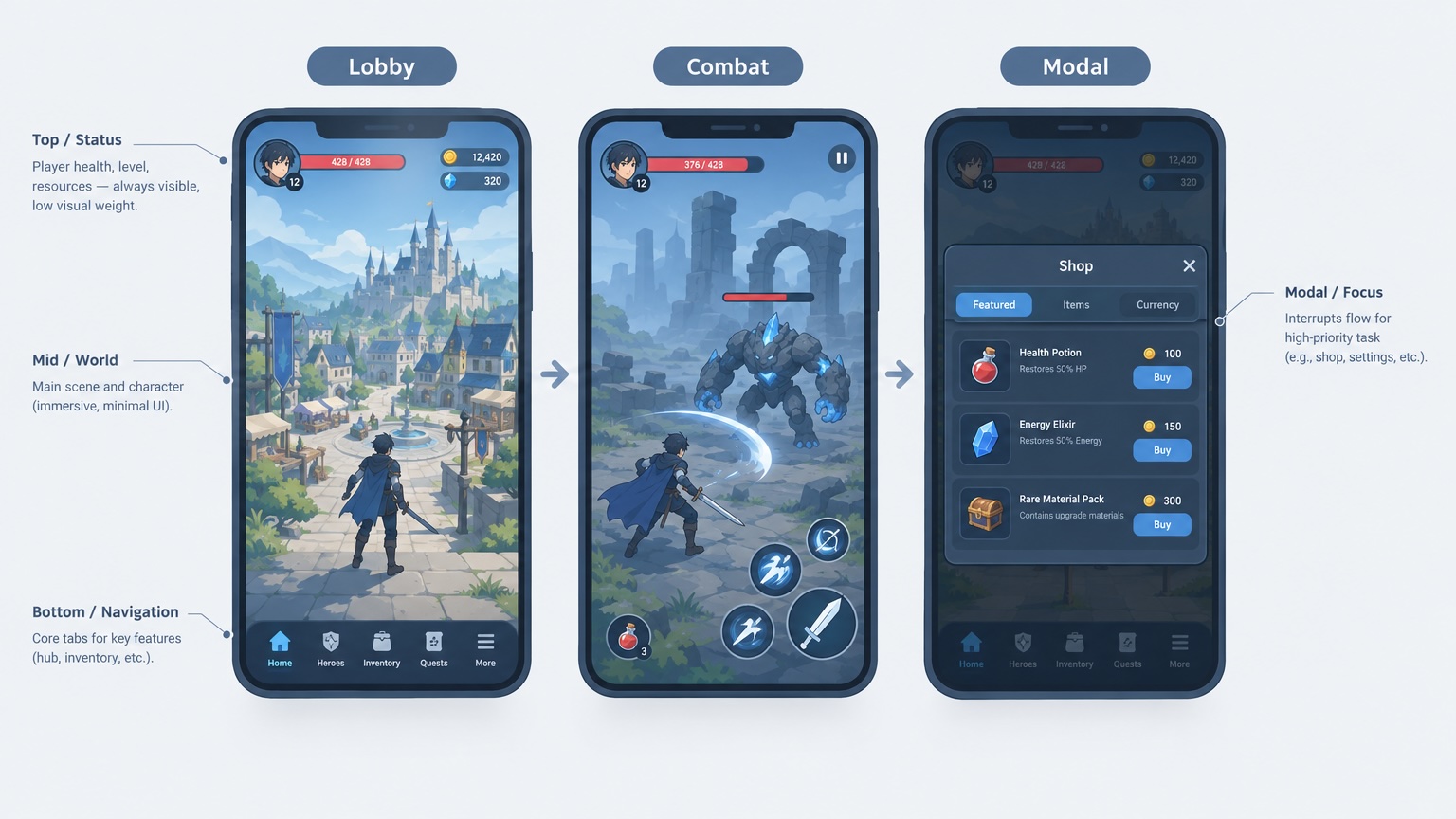
HUD failures are rarely “we forgot a health bar”—they are too many same-priority elements on one screen: lobby tabs during combat, a tappable shop over a cinematic, or underlying HUD still eating taps when a modal is open. Design mocks are often single-frame and never mark “hide currency in combat”—you need a state × layer spec so engineering can land visibility, input blocking, and draw order.
Below uses Unity UGUI (Prefab, Canvas.sortingOrder, Graphic raycasts) as the main wording. Godot: CanvasLayer layer + Control mouse_filter; Cocos: node draw order + BlockInputEvents / full-screen blockers—same criteria and tables. Safe Area, floating text, and Canvas ordering details: Safe Area, floating damage numbers. Device, all locales, and Release builds: pre-ship checklist items 1, 2, and 5.
Fail criteria (any one = not passed): during modal / cinematic / payment flows, underlying HUD still interactive (unless spec says “half-screen still operable”); in combat, non-combat promo that cannot be dismissed blocks the play area; the same info shown twice (e.g. top-bar coins plus large in-combat coin UI) with no product note; controls from the previous state remain (visible or still raycast-blocking); with multilingual stress locales, combat-minimal layout still clips long copy (DE/ES, etc.).
Define states first, then controls
| Game state (examples) | HUD goal | Usually show | Usually hide / degrade |
|---|---|---|---|
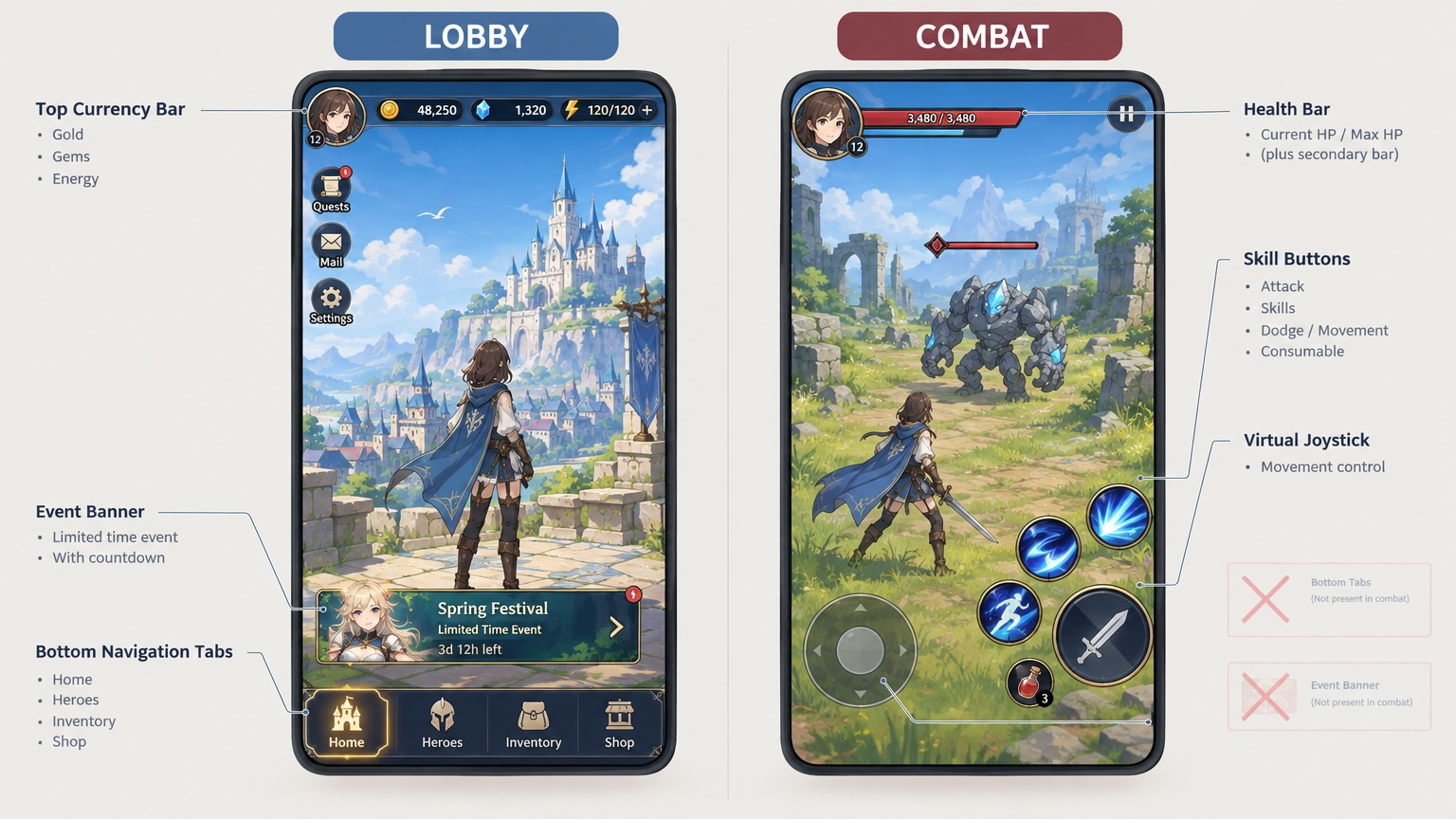
| Lobby / home | Nav + resources + events | Top currency, bottom tabs, event entry | Combat skills, crosshair |
| Combat / in-level | Actions + survival info | Health, skills, pause | Lobby tabs, full-screen event banners |
| Cinematic / CG | No input or skip only | Skip button | Nearly all HUD (or skip only) |
| Modal (shop, settings) | Focus on dialog | In-modal controls | Underlying HUD raycasts off or whole layer hidden |
| Payment / compliance | Finish flow | Terms, confirm | In-game promo overlays |
Agree the state enum with design + engineering (e.g. GameUIState.Lobby | Combat | Cinematic | Modal). UI roots subscribe to the state machine (Unity Prefab groups / Godot scene branches / Cocos prefabs)—avoid scattered SetActive / visible on every button script.
Layers and sort order (engine-neutral spec)
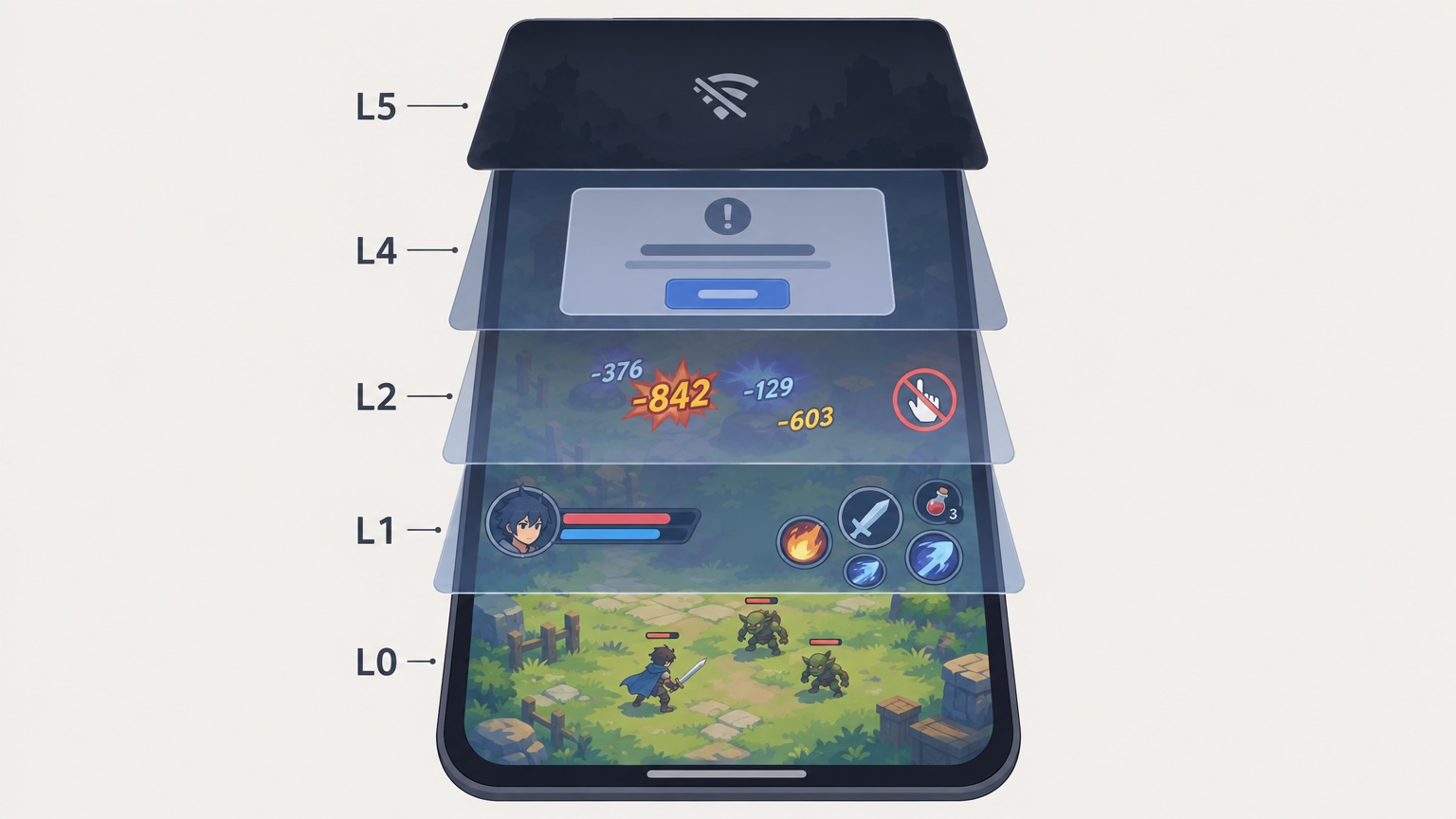
Document bottom to top (higher number = in front):
| Layer | Content | Input |
|---|---|---|
| L0 | Full-screen background / scene UI bleed | None |
| L1 | Combat HUD (health, joystick placeholder) | Yes |
| L2 | Combat floating text / tips | No raycasts (see floating damage numbers) |
| L3 | System toast / marquee | Usually none |
| L4 | Modal / full-screen dialog | Yes; blocks L1–L3 taps |
| L5 | Network drop, forced update | Yes; blocks all |
Unity: sortingOrder / multiple Canvases; Godot: CanvasLayer layer; Cocos: sibling order under one Canvas or layered Canvas + mask. When a modal opens, raise L4 and disable L1 raycasts / mouse_filter / BlockInput—not just “drawn on top but taps pass through.”
Information priority (combat example)
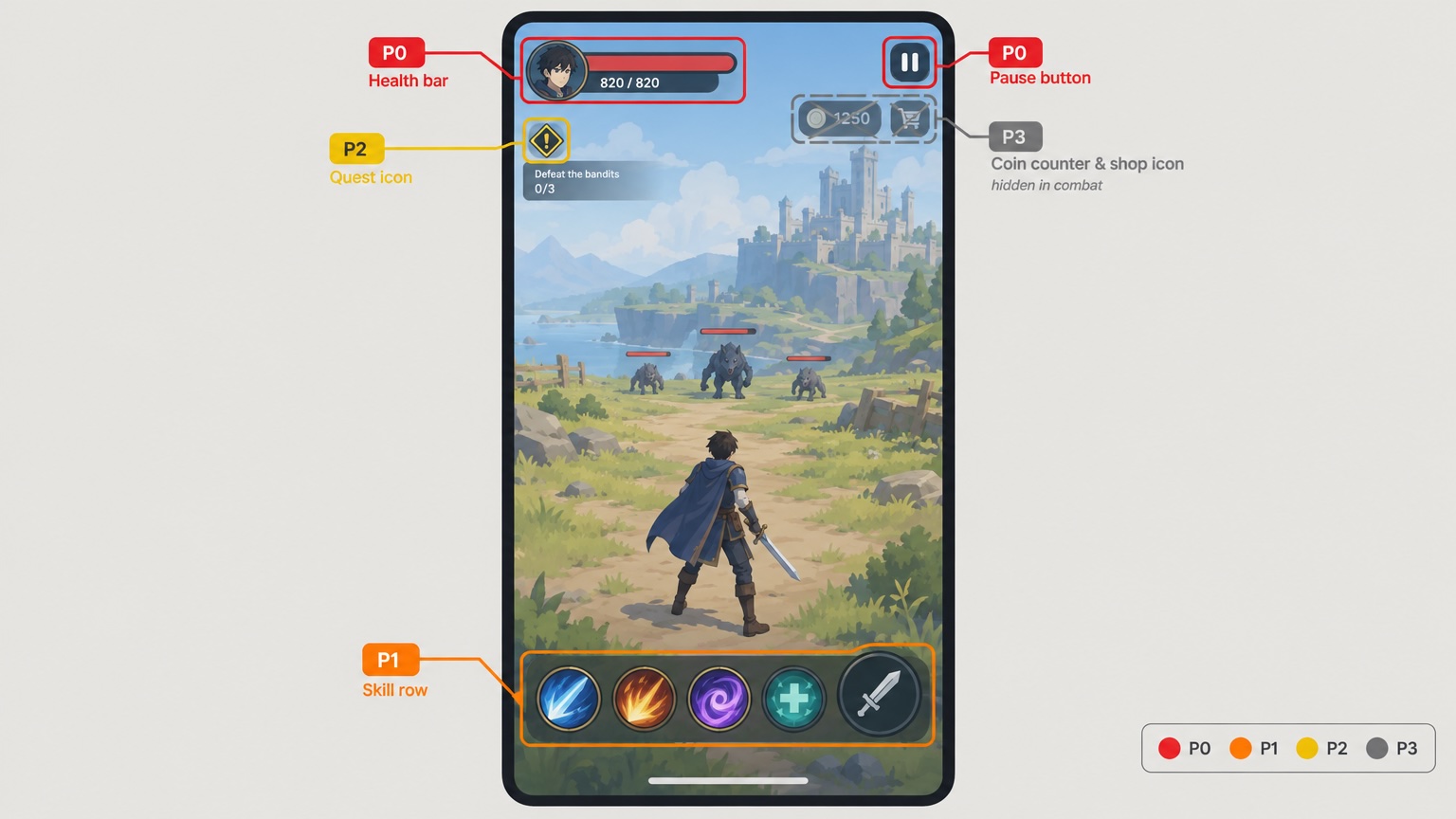
If combat can only keep N readable blocks on small screens, default caps:
| Priority | Block | Degrade strategy |
|---|---|---|
| P0 | Health / fail-condition related | Do not hide |
| P0 | Pause / exit combat | Do not hide |
| P1 | Skills / primary actions | Merge to fewer buttons |
| P2 | Short objective text | Icon + long-press detail |
| P3 | Currency, event entry | Hidden in combat by default or in pause menu |
| P3 | Chat entry | Collapse to icon |
Degrades must stay readable in multilingual stress locales (DE/ES, etc.)—not English-only shrink tests.
Acceptance (5 steps)
- List states — From main flow, enumerate transitions (enter level, open shop, CG, reconnect).
- Screenshot per state — Editor Play and device Release each (pre-ship items 1 and 5); verify nodes with
SetActive(false)/visible=falsestill block input. - Modal spot-check — With shop / settings / payment open, taps on former HUD buttons must do nothing (full-screen transparent raycast or BlockInput mask).
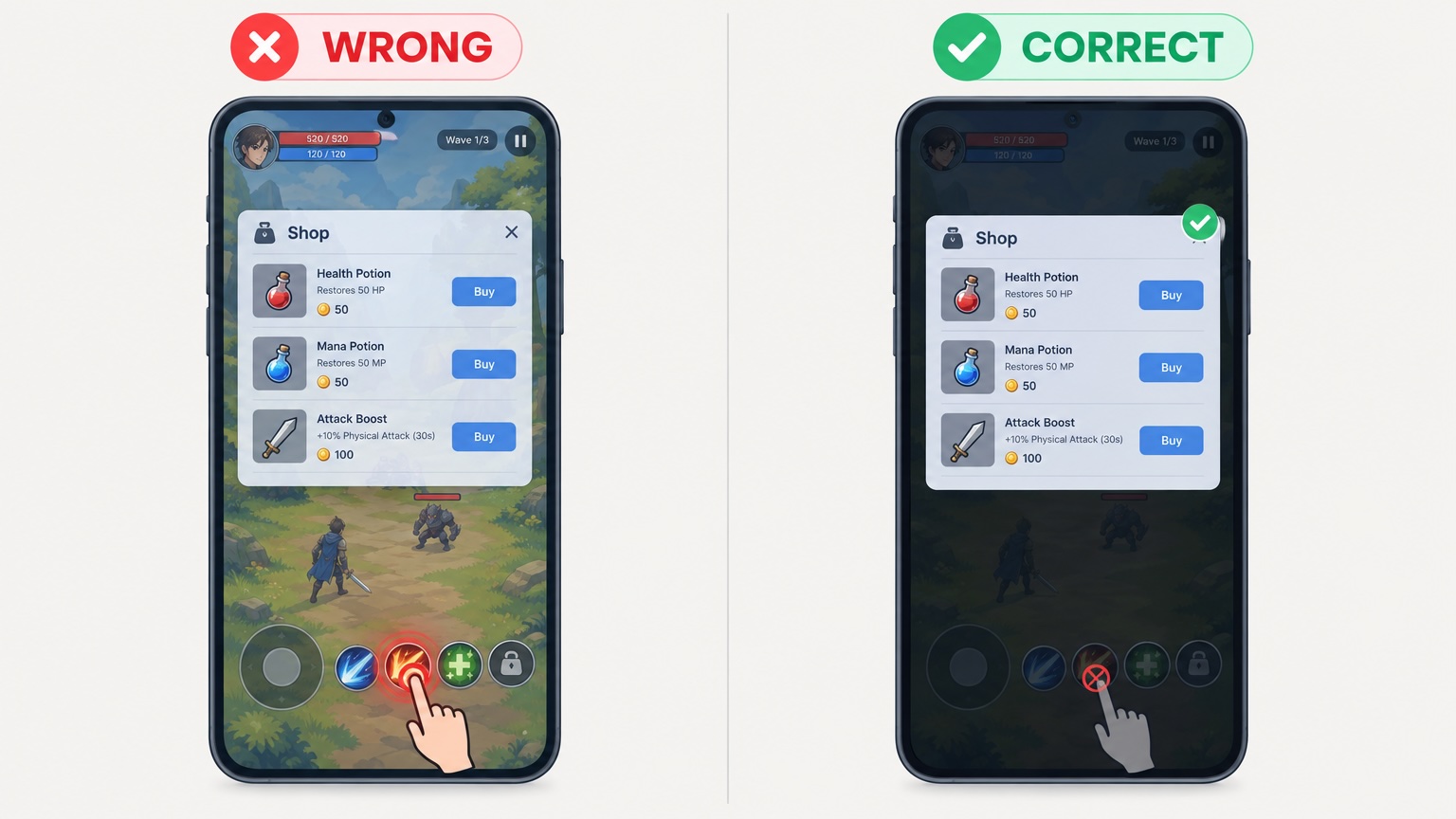
- Cross with Safe Area — Combat P0 controls inside safe inset (see Safe Area).
- Commit versioned assets — State table drives visibility (Unity ScriptableObject / Godot Resource / Cocos config)—not Scene-only temporary hides.
What design should add
| Deliverable | Purpose |
|---|---|
| Per-state wireframes (at least Lobby / Combat / Modal) | Engineering configures visibility |
| Combat “may hide” list on mock | Avoid painting every element on one frame |
| Modal spec: dimmed background, tap-through allowed? | Sets raycast policy |
| Promo / event layer z-order | Align with L4/L5 |
Designers need not write the state machine—tables + annotations reduce guesswork.
Fix routing
| Symptom | Likely cause | Action | Owner |
|---|---|---|---|
| Can still tap combat after dialog | Underlying raycasts on | Disable Graphic raycast on modal layer / full-screen mask | Engineering |
| Full-screen event in combat | No state table | Hide P3 in combat; design sign-off | Engineering + design |
| HUD left after cinematic | No Cinematic state hook | State machine hides HUD uniformly | Engineering |
| Two currency displays | Lobby bar not off in combat | Hide top bar in Combat or merge data source | Engineering + design |
| Long locale clips in combat minimal layout | DE/ES not tested | Locale overflow path | Design + engineering |
FAQ
Two Canvases for lobby and combat?
Fine—or one Canvas with groups. What matters is state visibility + raycasts, not Canvas count.
Half-screen shop—is that a modal?
Yes. Spec whether underlying is tappable and whether combat logic pauses.
Conflicts with “less is more” UX?
The hierarchy table is a product rule, not aesthetics; P3 can reopen for events via state machine flags.
World-space overhead bars in 3D?
They are combat info, managed with L1; world-space sort rules align with floating damage numbers and Safe Area guidance.
Keep reading
More guides you might like
Game UI Design: Traditional Workflow vs AI Art + VberAI Studio In-Place Split
Compare PS/Figma hand slicing with VberAI Studio: import or AI-generate UI, auto split layers, export layered PSD or image sets. Effects, steps, and demo videos.
- game-ui-design
- game-ui-designer-flow
- ui-slicing
- AIGC
Game UI Nine-Slice and Scalable Panels: Figma / PSD Marks and Engine Sliced QA
When panels and fields need 9-slice, how to mark borders and export scale in design, and how to fail/pass Unity UGUI Sliced, Godot StyleBox, and Cocos caps—with fix paths. Extends handoff checklist item 6.
- game-ui-design
- game-dev-ai
- ui-slicing
- figma-to-unity
AI Tools for Godot and Unity Development: How MCP and AI Studio Split the Work
AI tools for Godot and Unity by stage: Cursor, Claude Code, Cline, engine MCP, AI Studio UI handoff, matting—where VberAI fits in 2026.
- ai-tools
- godot
- unity
- mcp