
Game UI Locale Overflow: Design Headroom and VberAI Studio Translate Export QA
How to fail/pass when German or Spanish copy breaks buttons and lists, how to reserve width in design, and how to compare locales on the VberAI Studio canvas before full-tree re-export—extends handoff and pre-ship checks with fix paths.
- game-ui-design
- game-dev-ai
- ui-localization
- i18n
- figma-to-unity
- psd-to-unity
- vberai
- ai-studio
- unity
- godot
- cocos
- 2026

Shippable UI often fails localization for a reason other than bad translation: the same layout cannot fit the translated copy. Button text gets clipped by RectTransform, list rows collapse from two lines into one, tabs stay crowded yet show ellipses. A pass in the Unity Editor with placeholder English hides the problem until German or Spanish is tested—then fixes usually touch both the design source and Prefabs.
Layout and clipping examples below use Unity UGUI (RectTransform, Prefab, and so on). Godot Control and Cocos UI use the same ideas via anchors, minimum_size, and prefabs; design headroom and overflow criteria apply the same way.
Design handoff checklist items 9–11 already call out copy-length headroom and same-structure locales. This post adds reference ranges, a design-side tick list, canvas QA after VberAI Studio translate, and pre-ship fail criteria. Safe Area on device, Release build assets, and related checks stay in pre-ship UI checklist items 1, 5, and 6.
Fail criteria (any one = not passed): readable copy is clipped or overlaps; ellipses or marquee without product spec; visual button frame does not match the hit area; a locale’s main-flow screen needs a unique Hierarchy change to show full text (conflicts with same-structure multilingual goals).
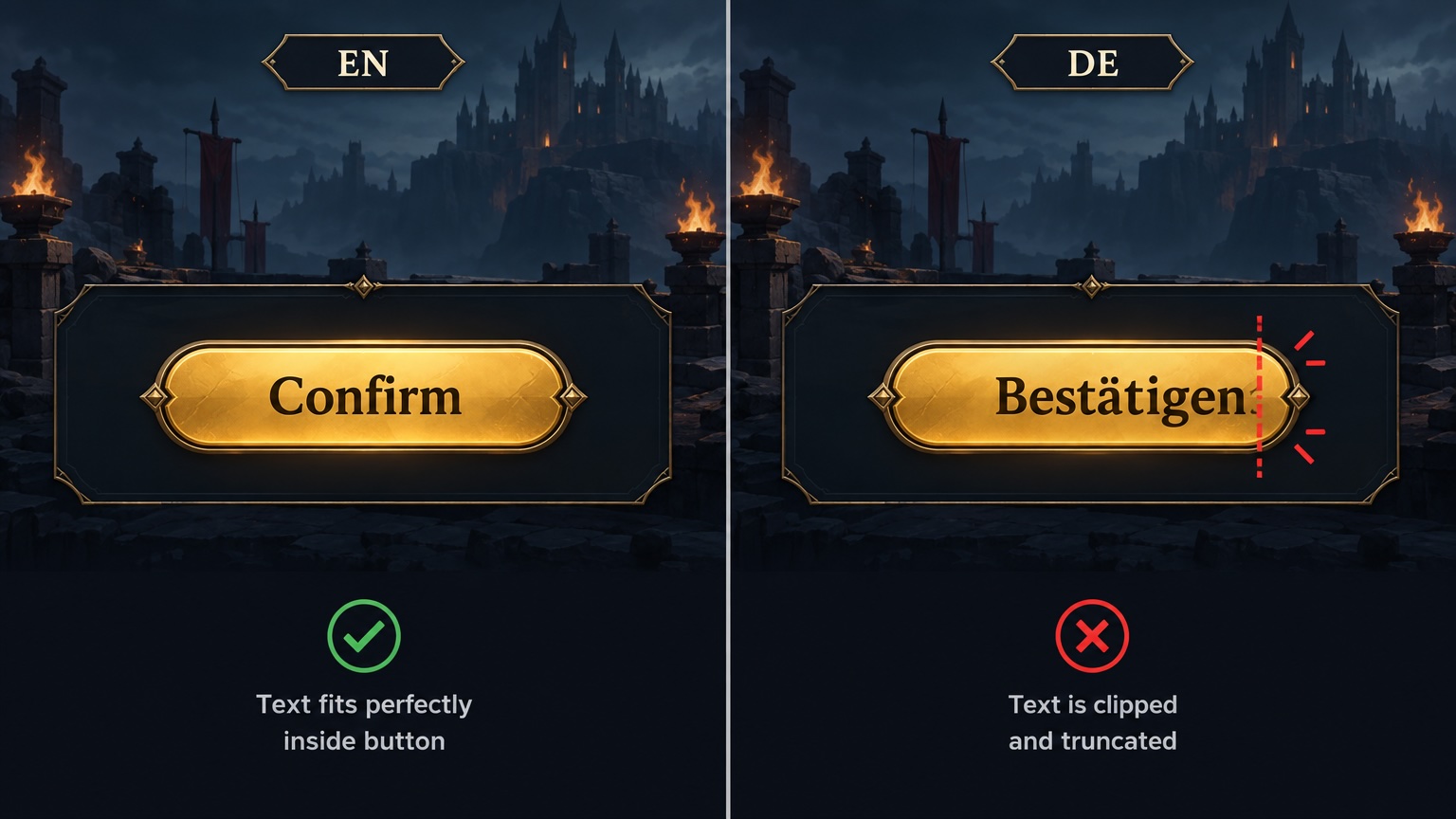
Copy expansion: reference ranges for design
Localization teams often estimate growth relative to English or the source language. These are not contractual SLAs—set internal thresholds with your UI typeface and sizes. Use the table to pick 2–3 stress locales for design review before handoff, not to predict exact string lengths.
| Relationship | Typical pattern (mobile buttons, short labels) | Design action |
|---|---|---|
| DE / ES / PT vs short Chinese labels | Same meaning often needs ~+25% to +40% horizontal space (compounds, articles) | Put button min-width and tab fixed width or wrap rules in the spec |
| EN vs ZH on the same button | Similar length or EN slightly longer—do not treat EN width as sign-off for all locales | Spot-check DE or ES in addition to EN |
| FR / IT | Medium-long; list subtitles often need two lines | Reserve a second line or cap subtitle length |
| VI / ID | Latin script but variable word length | Same stress level as ES |
| AR | Length plus RTL and numeral shaping; mirrored layout is a separate topic | This post assumes LTR same structure; RTL needs its own design or engine mirror rules |
| JA / KO | Full-width mix: visual width is not linear with character count | Measure rendered string width at target size; do not count characters only |
Engine note: Unity TextMeshPro Auto Size only shrinks between min/max font sizes. If text still overflows at the minimum size, that is layout capacity, not something to fix by shrinking further—widen the container or change copy in design.
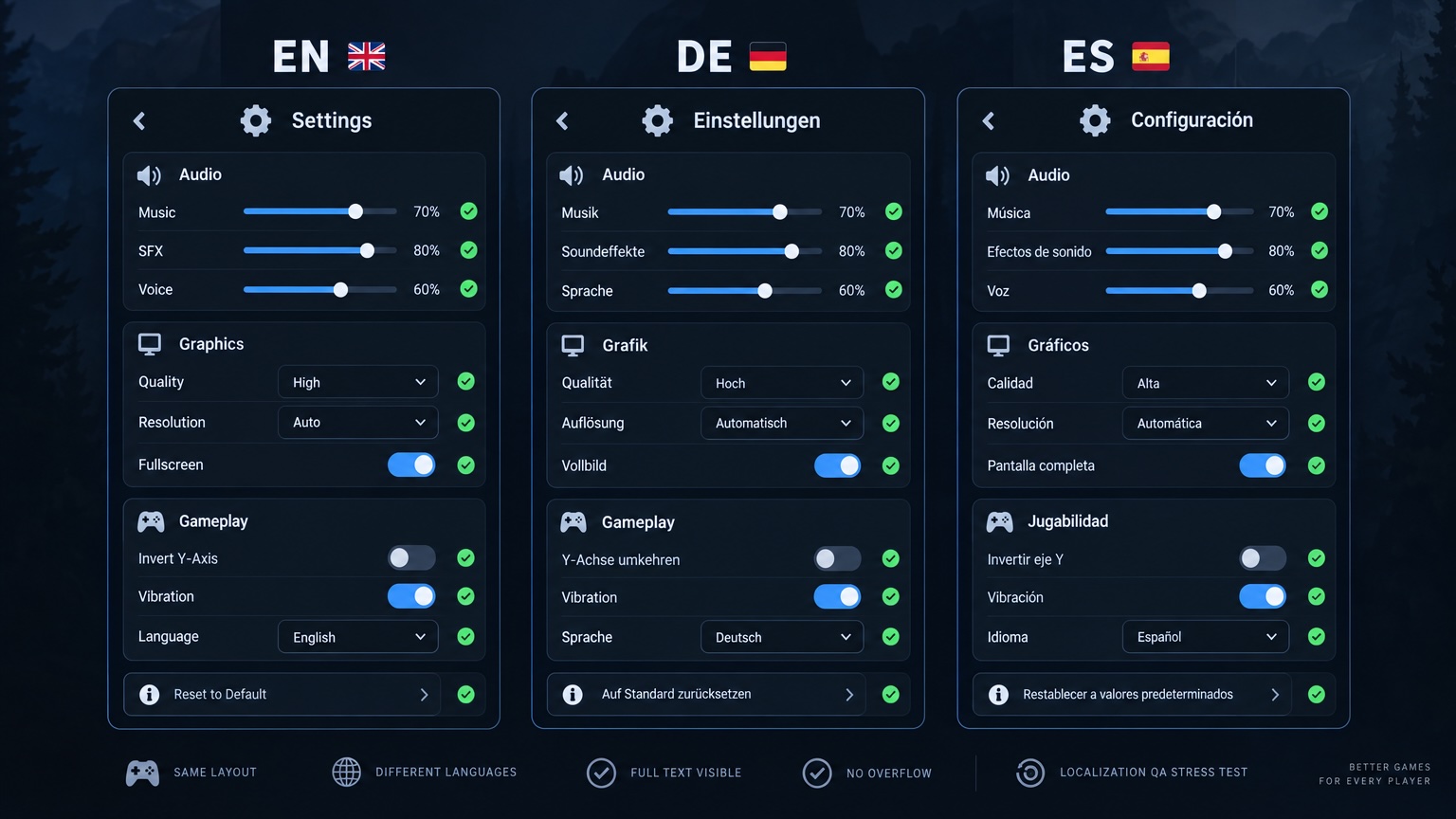
12 design checks focused on overflow (tick list)
On top of the general 12-item handoff list, tick these for locales:
| # | Check | Pass standard |
|---|---|---|
| 1 | Primary button copy is a text layer, not raster display type | Swappable strings; list non-localized display type in the spec |
| 2 | Button container has min-width (Figma Auto Layout or fixed width) | DE/ES pseudo-locale or real strings do not overflow |
| 3 | Tab / bottom bar: fixed cell or explicit two-line allowance | No “looks single-line, actually clipped” |
| 4 | List rows: title and subtitle on separate lines; subtitle has max lines | If two lines fail, shorten copy or widen the list |
| 5 | Numbers, currency, timers, and units are separate fields | No whole-sentence raster; formats live in string tables |
| 6 | Icon + text: text width independent of the icon | Longer copy does not squash the icon |
| 7 | Nine-slice panel padding and content padding are sufficient | See handoff item 6; stretch region does not hug text |
| 8 | Dialog title, body, primary/secondary buttons are separate layers | Spec for wrap or one step smaller type when title is long |
| 9 | Event badges and short copy near red dots have max length | Ops copy over limit goes back for edit—not emergency squeeze |
| 10 | Multilingual variants: same Frame structure, text only | No locale-only controls unless the spec allows |
| 11 | Export notes list which stress locales were reviewed | Engineering / QA know the acceptance baseline |
| 12 | Full-screen concept still has readable text | Split text layers or accept re-export before engine (in-place slice) |
Figma Auto Layout hug/fill, min/max width, and text truncate must match engineering agreement—if the product forbids ellipses, do not pass the mock with truncate alone.
VberAI Studio path: translate → compare → full-tree re-export
VberAI Studio (AI Studio, ≠ Google AI Studio) one-click translate aims to change readable copy only—geometry and hierarchy stay the same. That aligns with engine work where only CSV / string tables change and Prefab structure stays—different stages on the same localization pipeline: Studio owns multilingual visual design and export; TMP and string tables own runtime switching.
Recommended order (same as canvas → Prefab):
| Step | Action | Acceptance |
|---|---|---|
| 1 | Lock primary layout on canvas or Figma/PSD | Text layers and button bounds are clear |
| 2 | Run one-click translate per screen (by ship locale batch or multi-locale) | Layer hierarchy and node names unchanged |
| 3 | On canvas, compare the 2–3 locales with the longest text side by side or by toggle (include DE or ES + primary ship locale) | No overflow, no overlap |
| 4 | Review machine-translated strings that are too long | Edit copy or tweak size within spec; human sign-off on legal/brand lines |
| 5 | Full-tree re-export Prefab (Unity UGUI / Godot Control / Cocos UI) | Matches canvas; do not only edit Text in the project without syncing design source |
| 6 | Align string tables with Prefab default copy in the project | Play mode locale switch matches the canvas |
Same layout, theme-only changes: reskin. After reskin, if you add new ship locales, still translate then export—avoid hand-editing Text in Scene while repo Prefabs drift (pre-ship item 6).

Pre-ship acceptance: tie-in to the test checklist
Pre-ship checklist item 2 requires every live locale on home and key popups. Suggested execution:
| Item | Practice |
|---|---|
| Locale priority | Before full locale pass, smoke stress locale + primary ship locale |
| Scope | Main HUD, high-frequency popups, payment/age/legal long-copy screens |
| Environment | Unity Editor locale switch does not replace device font rendering checks (especially CJK + Latin mix) |
| Pass | No clip, no undeclared ellipsis, hit areas match visuals |
If strings change in-engine only and layout unchanged yet overflow persists → treat as insufficient design headroom or missing stress-locale canvas QA, then fix per the table below—not a permanent global font shrink on the Prefab.
Fix routing
| Symptom | Likely cause | Action | Owner |
|---|---|---|---|
| Single button or label overflow | min-width too small; display type used as body | Widen design or shorten copy; move to text layer | Design |
| Many overflows on one screen | Primary mock too tight; no stress locale review | Figma/canvas Auto Layout → Studio re-translate → full-tree re-export | Design + Engineering |
| Unity Editor OK, one locale fails on device | Fallback font wider; DPI | Re-test on device; adjust Font Asset / container | Engineering |
| List two lines in one locale only | Subtitle translation too long | Localization shortens or row height increases (re-export if structure changes) | Localization + Design |
| Runtime switch fails, canvas OK | String table vs Prefab mismatch | Align table and default Text; check line breaks | Engineering |
| After event reskin, locale still shows old layout | Reskin swapped art only, no Prefab re-export | After reskin, re-run translate + export per locale | Design |
Decision rule: if structure stays the same → prefer copy, min-width, and VberAI Studio canvas QA then re-export. If you must add/remove nodes or change tab count → layout change—update the primary mock and all locale specs; do not patch one locale’s Prefab alone.
Division of labor vs “string table only”
| Approach | Fits | Does not fit |
|---|---|---|
| Engine string table / TMP | Layout verified; runtime locale switch only | First UI import with no stress-locale QA |
| VberAI Studio translate + export | Design-driven; multilingual visual parity; Figma/PSD source | Replacing legal or payment compliance review |
| Hand-edit Prefab Text | Emergency hotfix for one or two strings | Long-term multilingual maintenance (Scene drift) |
Full chain: design headroom → VberAI Studio multilingual mock → export Prefab → align string table and defaults → pre-ship all-locale smoke. Binding and Play QA after import: engine + MCP checklist.
FAQ
TMP Auto Size at minimum still overflows—is that an engineering bug?
Usually no. Auto Size only scales inside the container. If width was fixed at handoff, widen design or change copy, or allow two lines per spec.
Layout is “theoretically unchanged” after translate—still re-export Prefab?
If UI came from VberAI Studio export, full-tree re-export after copy is final keeps repo Prefabs aligned with the canvas. Text-only edits in the project without syncing the canvas are lost on the next reskin or re-export.
Can RTL (Arabic, etc.) use this same-structure checklist?
LTR same-structure width rules still help. RTL also needs mirror layout and numeral direction—do not assume translate-only strings are enough to ship.
Must we re-translate on event reskin?
If reskin does not change copy, no. If event copy changes with the skin and node names stay the same, re-check stress locales on the canvas then re-export.
German is long—can we shrink font size for that locale only?
Only if the product spec defines a global “−1 step” for that locale. Otherwise prefer min-width and shorter copy so readability stays consistent across buttons.
Is VberAI Studio the same as Google AI Studio?
No. VberAI Studio is game UI canvas, translate, and multi-engine export; Google AI Studio is Google’s general AI dev environment. See comparison.
Keep reading
More guides you might like
Game UI Design: Traditional Workflow vs AI Art + VberAI Studio In-Place Split
Compare PS/Figma hand slicing with VberAI Studio: import or AI-generate UI, auto split layers, export layered PSD or image sets. Effects, steps, and demo videos.
- game-ui-design
- game-ui-designer-flow
- ui-slicing
- AIGC
VberAI Audio Guide: Game Voice, SFX, and Music That Iterate Faster
Generate game voice, monster VO, SFX, and music in VberAI Studio: prompt formulas, samples, a gothic dungeon case, tips, and free libraries.
- vberai
- ai-studio
- game-audio
- voiceover
Cursor Broken After Cocos Creator MCP: Fix Connection by Symptom
Cursor looks “broken” after wiring VberAI Cocos Creator MCP: missing service, red MCP errors, connected but no tools. Check Cursor first, then jump the four-layer path to Creator extension, activation, and ports.
- cocos
- cocos-creator
- mcp
- cursor