
Which AI Tool for Game Design Art? Game Asset Generators vs General AI Art (2026)
Which AI tool for game design art? Compare Layer AI, PicLumen, Meshy, Morphic, Unity AI UI, and general tools like Midjourney by deliverable type (concept, 2D, UI, 3D). See how VberAI Studio extends the pipeline with canvas edit, split, and prefab export to Unity / Godot / Cocos—plus planned 3D-to-prefab sync.
- game-art
- ai-tools
- concept-art
- game-ui
- 3d-assets
- comparison
- vberai
- ai-studio
- tutorial
- layer-ai
- piclumen
- meshy
- morphic
- midjourney
- stable-diffusion
- hunyuan-game
- prefab
- unity
- godot
- cocos
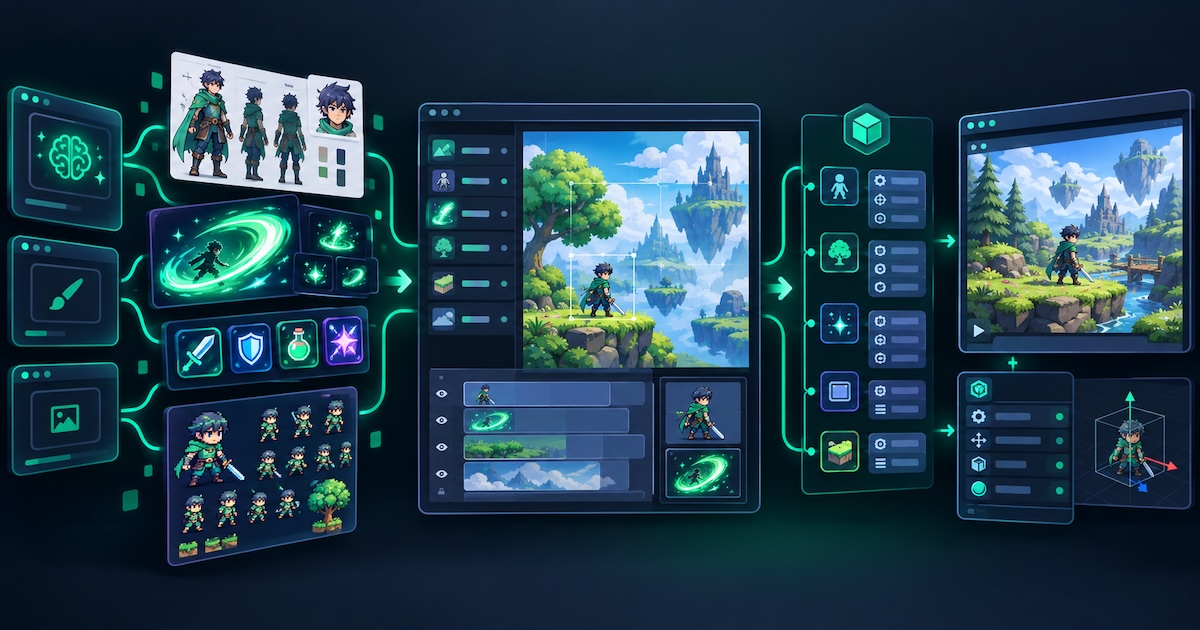
Tools fall into two buckets—game asset generators (Layer AI, PicLumen, Tencent Hunyuan Game, Vheer, etc.) and general AI art (Midjourney, Stable Diffusion, etc.). Most excel at getting an image. Teams often stall after that: matting, slicing, hierarchy, and how prefabs and components reach Unity / Godot / Cocos.
Pick by deliverable: concept art → Layer / Hunyuan / general art; shippable 2D → PicLumen / Vheer; UI / icons → Morphic / Unity AI UI; 3D → Meshy (today). VberAI Studio today focuses on the post-generation production layer for 2D: canvas edit, auto-split / UI split, prefab and component export, plus Engine MCP with Cursor / Claude Code in the editor. Planned: 3D asset generation with synchronized engine prefabs and components. Pricing follows each vendor (free tiers, trials, or credits are common).
Four deliverable types
| Type | Typical output | Acceptance bar | Tool direction |
|---|---|---|---|
| A. Concept art | Character keys, mood scenes, promo key visuals | Looks good, style holds | Layer AI, Tencent Hunyuan Game, general AI art |
| B. Shippable 2D | Turnarounds, pixel sheets, props | Usable specs, clean edges | PicLumen AI, Vheer AI, VberAI image gen + prep |
| C. UI / HUD | Buttons, currency icons, skill frames | Consistent set, readable | Morphic Canvas, Unity AI UI, VberAI UI split |
| D. 3D | Textured rough meshes, placeholders | Import to DCC / engine | Meshy AI (VberAI 3D on roadmap) |
Most projects mix A/B/C. A common mistake is treating concept art as engine delivery and skipping cleanup and structured export.
Tool overview
| Tool | Main lane | Strength | Typical end state | Native engine handoff |
|---|---|---|---|---|
| Layer AI | Game concept & assets | Train project style; unified visuals | 2D keys / textures | No |
| PicLumen AI | Game-ready 2D | Turnarounds, pixel, props | PNG / sprite sources | Image-level |
| Tencent Hunyuan Game | Industrial concept AIGC | Xianxia / anime / realistic drafts | Concept images | No |
| Vheer AI | Multi-style 2D | Pixel, low-poly 2D look, hand-painted | 2D design images | No |
| Morphic Canvas | Game UI / icons | Lock first icon style; expand HUD | Flat UI art | No |
| Unity AI UI Generator | Unity UI | In-editor sprites / textures | Unity assets | Unity only |
| Meshy AI | 3D | Text / image → 3D + textures | GLB / FBX | Needs rework |
| VberAI Studio | Canvas → engine | 2D gen + edit + split + export; 3D + prefab sync (planned) | Scenes / prefabs / components | Unity / Godot / Cocos |
1. Game asset & concept generators
Layer AI
An AIGC platform for game art built around training a project-specific style so characters, props, and scenes iterate in one visual system.
- Pros: Long-run IP consistency; fewer “different artist every frame” issues vs generic text-to-image; good after direction is locked.
- Cons: Delivers art files, not engine UI trees; custom model training costs time; different lane from 3D or in-engine UI.
- Best for: Mid-to-large teams with a clear art direction and heavy concept output.
PicLumen AI
Centers on game-ready assets: character turnarounds, 2D pixel sheets, props, and high-res concept art.
- Pros: Specs align with games (turnarounds, pixel, props); indies get 2D reference fast; less ComfyUI assembly.
- Cons: “Game-ready” usually means image specs, not Prefab, anchor, or atlas rules; complex UI and localization need another pipeline.
- Best for: 2D / 2.5D teams that need character and prop plates quickly.
Tencent Hunyuan Game
Concept drafts and content generation on Tencent’s Hunyuan models (site). Regional product—check availability.
- Pros: Friendly to xianxia, anime, and realistic commercial art directions; fast concept cycles for alignment.
- Cons: Features and service area per official docs; concept-focused, not PSD / Figma → engine structure; Godot / Cocos still need your export path.
- Best for: Concept-heavy work with Chinese prompts and local aesthetic preferences.
Vheer AI
Pixel, low-poly 2D look, hand-painted styles; “quality mode” skews toward final-looking stills.
- Pros: Clear style tags for rapid prototyping; pixel and hand-painted map to common indie looks.
- Cons: “Low poly” here is 2D art, not Meshy-style 3D meshes; output is images—matting, slicing, and atlasing still apply.
- Best for: Indie prototypes exploring 2D direction in volume.
2. Game UI & icons
Morphic (Canvas / Image tool)
The Image tool covers skill icons, currency tokens, HUD pieces, etc., with style lock from the first icon to grow a full set.
- Pros: Consistent UI sets; neutral bases and readability; style lock cuts per-icon drift.
- Cons: Bitmaps or design files—not Prefabs or Themes; multi-resolution and localization finish in engine or Studio.
- Best for: Flat UI passes and full icon / HUD sets.
Unity AI UI Generator
AI UI generation inside Unity (Unity post) for sprites and textures.
- Pros: Zero distance from Unity workflow; less “external AI tool → import to Project”; fast UI prototyping.
- Cons: Unity-only; mostly texture / sprite level—hierarchy, scripts, and prefab wiring still manual or MCP-assisted; capabilities shift with Unity versions.
- Best for: Unity-only UI texture and prototype passes.
Neither Morphic nor Unity AI UI covers multi-engine prefab structure export—pair with UI layer split or in-place slice to engine.
3. 3D: Meshy AI
Text or images to 3D models with textures (Meshy).
- Pros: Moves a concept plate toward DCC- / engine-importable 3D; placeholders without a dedicated modeler.
- Cons: Shipping assets still need topology, LOD, rigs, collision, etc.; not interchangeable with 2D UI / sprite pipelines; most tools ship GLB / FBX—prefab structure is still manual or another tool.
- Best for: 3D concept validation and placeholders.
Planned VberAI 3D generation follows the same canvas → engine chain: 3D output plus synchronized Unity / Godot / Cocos prefabs and components (per shipped Studio features).
4. General AI art tools
Examples: Midjourney, Stable Diffusion / ComfyUI, Leonardo, Adobe Firefly. Not built for “game asset” labels, but often strong for inspiration, promo key art, and one-off mood frames.
| Dimension | General AI art | Vertical game generators |
|---|---|---|
| Single-image aesthetics | Often a strength | Product-dependent |
| Long-run style lock | Weak (LoRA / custom flows) | Layer-class tools stronger |
| Turnarounds / pixel / UI specs | DIY pipelines | Often built-in |
| Into engine | Almost always manual | Usually stops at files |
General tools fit pre-production and marketing; versioned production (many frames per character, full UI, localization) usually benefits from vertical tools or platforms with downstream pipelines.
5. VberAI: after generation, canvas → engine
Layer / PicLumen / Hunyuan answer what to paint; Meshy answers 3D files today; Unity AI UI answers sprites inside Unity. VberAI Studio answers after 2D generation: edit and split on one game canvas, export prefabs and components, and drive the editor via Engine MCP (what VberAI is). Roadmap: 3D asset generation with the same prefab and component sync as 2D—fewer “import mesh, hand-build nodes” gaps.
| Capability | Pros | Cons |
|---|---|---|
| AI image gen | Multiple models; early GPT Image 2.5 integration; images stay on canvas | Not a Layer-style custom style trainer |
| Canvas editing | PSD / Figma / project assets on one board | Learn Studio’s model |
| Split / UI split / in-place slice | Engine-oriented structure | Complex UI needs hotspot review |
| Export to Unity / Godot / Cocos | Scenes, prefabs, components | Not a one-click full game |
| 3D gen + prefab sync (planned) | Same canvas → engine path as 2D / UI | Per shipped Studio features |
| AI Super Matting | Glow / translucency / hair | Pick mode by plate type |
| Image pixelate | Controlled pixel look | Strict pixel lock may need touch-up |
| Engine MCP | Cursor / Claude Code on object trees | MCP does not generate images |
Open: AI Studio · AI Super Matting
Common combos:
- Layer / Hunyuan / Midjourney for direction → Studio iterate, split, export
- PicLumen / Vheer or Studio gen → matting → (optional) pixelate → split → engine
- Morphic for UI look → Studio slice → export prefabs
- 3D today: Meshy → DCC / engine; later Studio 3D with prefab sync; 2D UI still Studio or Unity AI UI
- After export, Engine MCP for scenes and scripts
Does not replace (today): Layer (custom style training), Meshy (standalone 3D file workflow), Unity AI UI (Unity-only texture path). VberAI Studio ≠ Google AI Studio (comparison).
Selection guide
| Primary goal | Start with | After generation |
|---|---|---|
| Unified concept style | Layer AI | Import to Studio or manual pipeline |
| 2D turnarounds / pixel / props | PicLumen, Vheer | Matting + atlas, or VberAI end-to-end |
| Enterprise AIGC concept drafts | Tencent Hunyuan Game, etc. | Same |
| Full HUD / skill icon set | Morphic | Studio split → prefabs |
| UI textures inside Unity | Unity AI UI | Build hierarchy in Unity |
| Rough 3D (today) | Meshy AI | DCC / engine; or watch VberAI 3D roadmap |
| Inspiration / single promo frame | General AI art | Import to Studio as needed |
| Multi-engine prefabs (2D / UI) | VberAI Studio | MCP in editor |
Boundaries
- “AI game design art” ≠ playable levels, tuning, or a finished game.
- “Game-ready” often means image specs, not Prefab / Scene structure.
- 2D UI and 3D tools are not interchangeable—know Sprite vs Mesh up front.
- VberAI 3D + prefab sync is planned; follow the live Studio panel.
- Fees and quotas per vendor sites.
FAQ
Which AI tool for game design art?
By deliverable: concept (Layer, Hunyuan, general art), 2D (PicLumen, Vheer), UI (Morphic, Unity AI UI), 3D (Meshy for now). For multi-engine prefabs on 2D / UI, continue in VberAI Studio; 3D prefab sync is on the roadmap.
Will VberAI do 3D?
On the roadmap: 3D asset generation with synchronized Unity / Godot / Cocos prefabs and components like 2D / UI. Today: 2D gen, edit, split, and export—see Studio when it ships.
Layer AI vs PicLumen?
Layer: custom style training and long-run unity. PicLumen: game-facing 2D specs (turnarounds, pixel, props). Both mainly deliver images.
Who is Tencent Hunyuan Game for?
Concept-heavy work, Chinese-friendly prompts, xianxia / anime / realistic directions—regional availability and features per official docs.
Can Meshy 3D ship as-is?
Usually needs topology, LOD, rigs, collision, etc.—good for validation and placeholders.
Unity AI UI vs VberAI?
Unity AI UI: sprites inside Unity, Unity-only. VberAI: gen, edit, split, multi-engine prefab export and MCP—composable, not either/or.
Can general AI art be game assets?
Fine for concept and promo; production often needs style lock, specs, matting / slicing, and engine structure.
Is VberAI just an image generator?
It includes 2D gen; the difference is canvas edit, split, prefab export, and Engine MCP—3D prefab sync is on the roadmap.
Already using Midjourney / PicLumen—need VberAI?
If the bottleneck is into the engine (matting, slicing, prefabs, multi-engine), import to Studio; for a single concept plate, optional.
Keep reading
More guides you might like
Wire an AI Studio HUD to Health Events with Unity MCP
After AI Studio exports a Unity HUD prefab, use Cursor + Unity MCP to subscribe health events, refresh the bar and damage text, with a Play-mode checklist and common break-point fixes.
- Unity MCP
- AI Studio
- HUD
- Unity
How to Set Up Cocos Creator MCP with Cursor and Claude (Video Tutorial)
Connect Cocos Creator MCP to Cursor or Claude: install the plugin, configure Model Context Protocol, and verify AI can control the editor.
- cocos
- cocos-creator
- mcp
- cursor
Game UI Design: Traditional Workflow vs AI Art + VberAI Studio In-Place Split
Compare PS/Figma hand slicing with VberAI Studio: import or AI-generate UI, auto split layers, export layered PSD or image sets. Effects, steps, and demo videos.
- game-ui-design
- game-ui-designer-flow
- ui-slicing
- AIGC