
Game UI Safe Area and Device QA: Debug Order and Prefab Fixes
When the Unity Editor looks fine but notches clip HUD or taps miss: classify failures, debug Canvas Scaler and Screen.safeArea, fix Prefabs vs Studio re-export—with design safe-zone marks as support.
- game-ui-design
- game-dev-ai
- ui-to-engine
- safe-area
- unity
- godot
- cocos
- vberai
- qa
- 2026

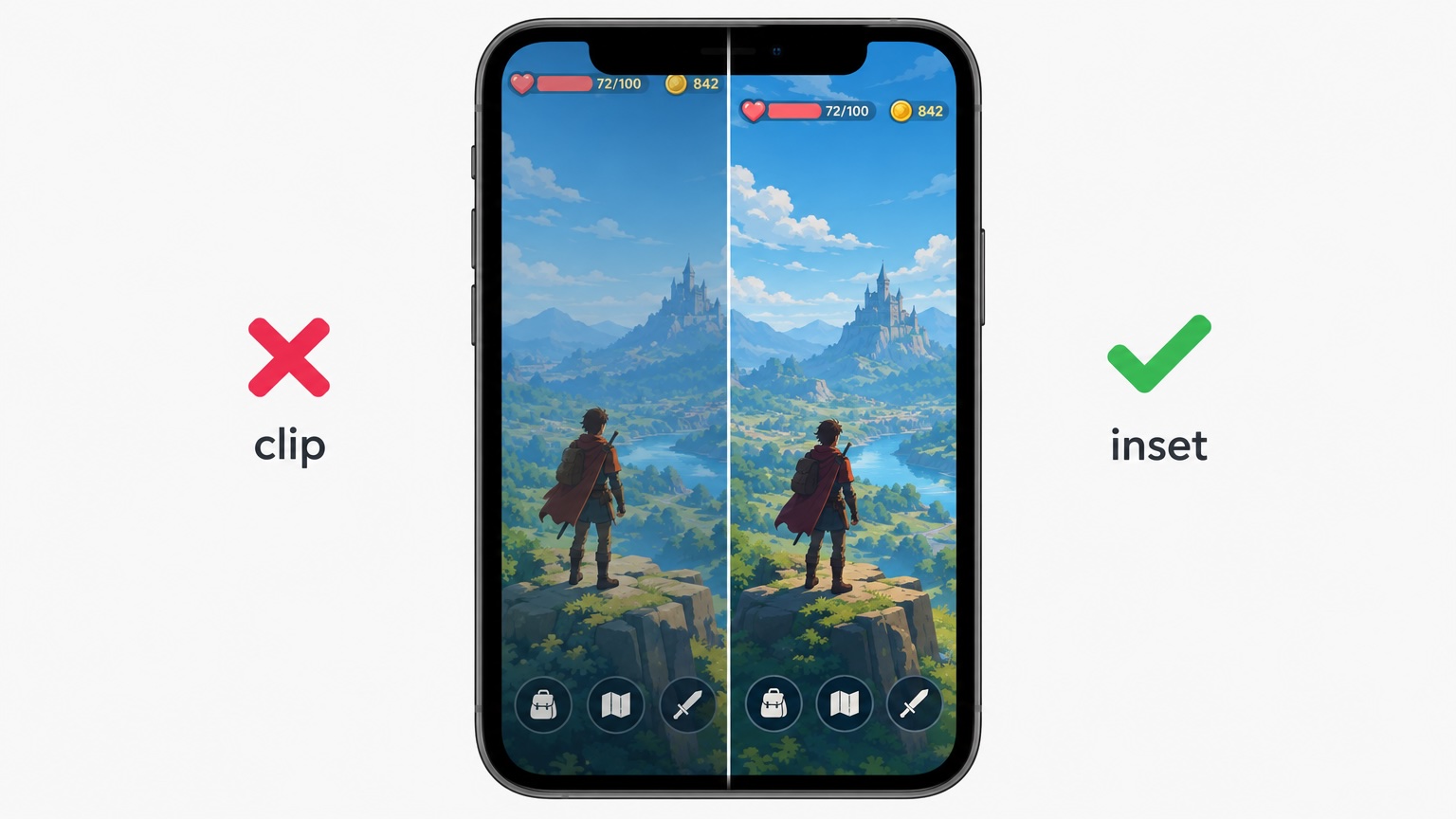
The most common report: Game view looks fine, but on a tall phone the HUD sits under the notch, or buttons look tappable but hits miss. Safe Area is not “nudge the Anchor”—it is root Canvas policy, full-bleed background vs inset content, and whether runtime safeArea matches the channel.
Failure classes, Unity UGUI debug order, Prefab fix rules, and channel/mini-game caveats are covered below. Design handoff item 7 safe-zone marks are summarized under “what design must supply”; pre-ship item 1 device scope is expanded here—not a repeat of engine + MCP checklist Raycast / first Play.
Godot / Cocos: Map to DisplayServer.get_display_safe_area() / engine SafeArea widgets; same step order as Unity below.
Fail criteria (any one = not passed): primary readable UI or required buttons under system occlusion (notch, home indicator, rounded corners); obvious visual vs hit offset; Editor 16:9 only with no target aspect on device; Dev vs Release Safe Area behavior differs without spec.
Classify first: clip, offset, or background only
| Symptom | Suspect first | Debug step |
|---|---|---|
| Visual clip (text/icons in notch) | Content not inset; root treated as full screen | Check safeArea vs content rects |
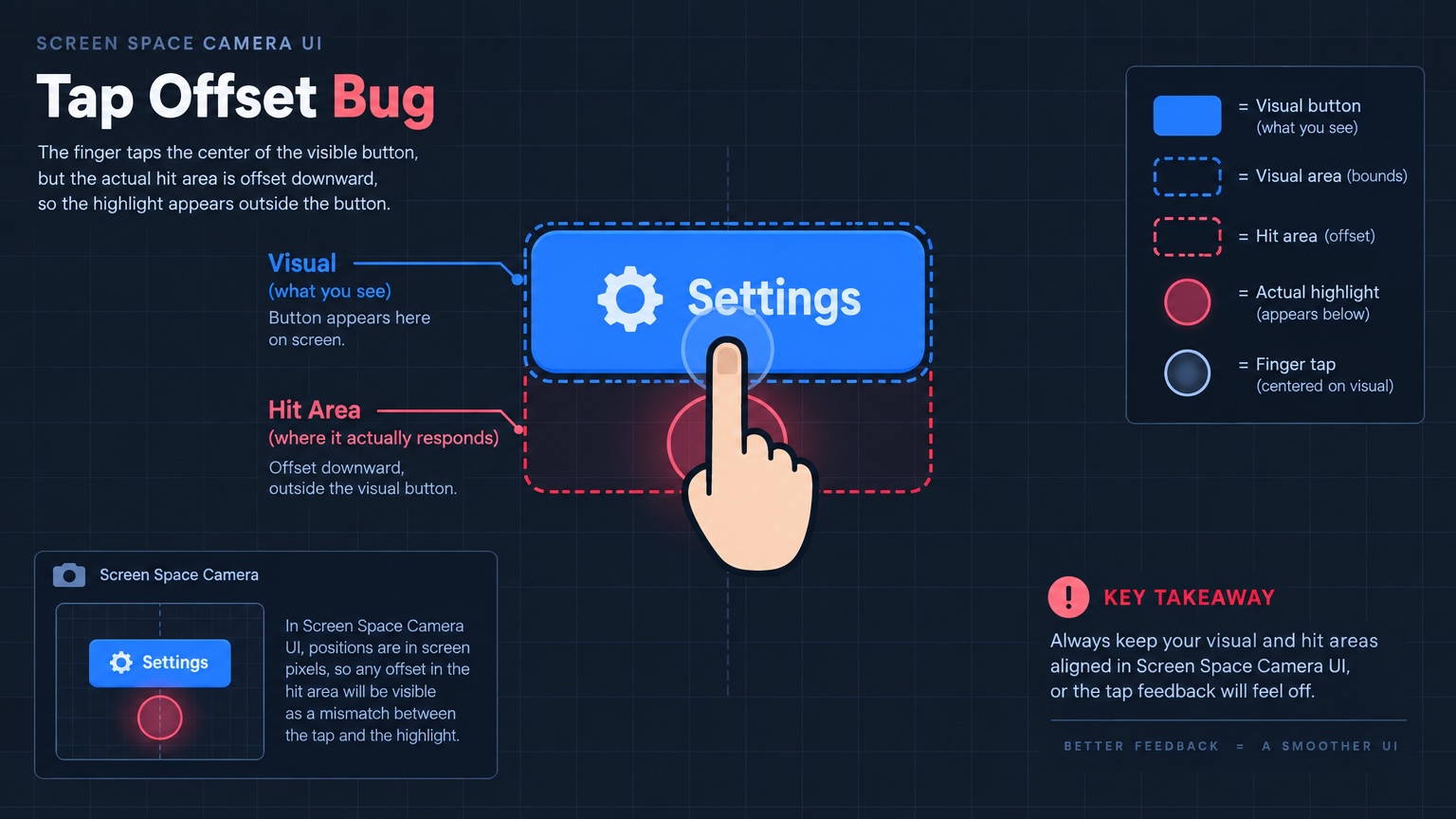
| Tap offset (looks right, misses) | Canvas scale mode, multiple Canvases, camera mismatch | EventSystem raycast + Canvas renderMode |
| Background clipped, buttons OK | Full-bleed bg by design, content inset | Not a fail if spec allows |
| Wrong after rotation | No listener for orientation / safeArea change | Recompute inset on rotate |
| One channel build only | SDK changes safeArea or resolution | Smoke that build; do not rely on generic Android only |
Unity UGUI: recommended debug order (6 steps)
1. Lock reproduction
Record device, OS, Dev/Release, orientation, Game view resolution. Pre-ship item 5: run main HUD on Dev and Release.
2. Log safeArea and reference resolution
After main UI loads, log:
Screen.width/Screen.heightScreen.safeAreaDisplay.cutouts(Android 11+ if used)
Read: safeArea smaller than screen → content inset required. In Editor safeArea often equals full screen → not a substitute for device.
3. Canvas root and Canvas Scaler
| Check | Typical mistake | Fix direction |
|---|---|---|
Root Render Mode | Mixed Screen Space / Camera UI → ray offset | One mode for UI |
| Canvas Scaler | Reference resolution ≠ project portrait baseline | Match engine checklist item 1 |
| Match width/height | Long aspect scales wrong; edge widgets drift | Agree Match with design/prod; fix Prefab not Scene-only |
| Multiple Canvas sort | Hits go to wrong layer | Align sortingOrder and raycast targets |
4. Layer: full-bleed background vs safe content
Suggested Prefab hierarchy:
Canvas
├── Background_FullBleed   (full anchor, may enter notch, no input)
└── SafeRoot               (Safe Area component or safeArea-driven padding)
    ├── HUD_Content
    └── Popups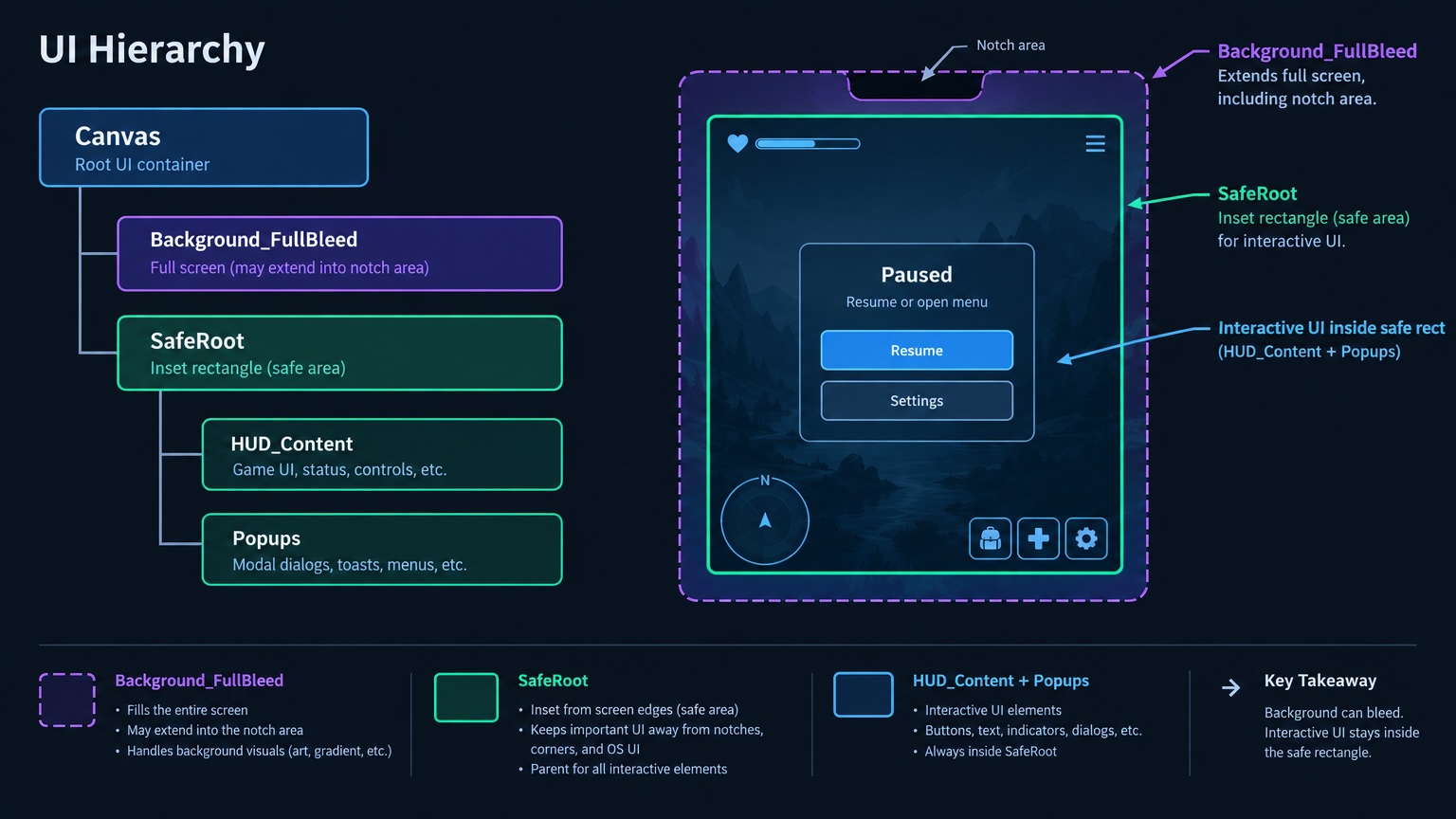
Use Unity Safe Area (or project code setting offsetMin/Max from Screen.safeArea). Do not stretch interactive buttons full screen without inset.
Studio exports with one flat layer: see nine-slice / structured re-export and canvas → Prefab.
5. Device tap spot-check
3–5 critical buttons on main flow; compare visual center to finger. Offset only on one popup → check nested Canvas or double Scaler.
6. Commit Prefab in repo
Pass criteria live in versioned Prefab, not test Scene overrides (pre-ship item 6). After Anchor changes, run locale overflow smoke on stress languages.
Channel / mini-game
| Scenario | Note |
|---|---|
| Native app | Screen.safeArea + real devices |
| Some mini-games / quick apps | Container safeArea / systemInfo ≠ Editor sim |
| Android cutouts | cutout vs safeArea may differ |
| PC / deck | safeArea often full screen |
Pattern: ISafeAreaProvider (or equivalent); inject per platform—avoid #if in HUD Prefabs.
Fix routing
| Symptom | Likely cause | Action | Owner |
|---|---|---|---|
| Device clip, Editor OK | No SafeRoot / no safeArea driver | Layer Prefab + Safe Area; retest device | Engineering |
| Background OK, buttons clipped | Buttons under bleed layer | Move to SafeRoot; Studio re-export layers | Engineering + Design |
| Tap offset | Multi Canvas / camera UI / nested Scaler | Merge Canvas or unify raycast camera | Engineering |
| Drift on resolution change | Fixed anchors only | Fix anchors; engine item 6 | Engineering |
| Design has no safe frame | Missing handoff item 7 | Design adds notch/home refs; re-export | Design |
| Flat Studio export | BG + HUD not split | In-place split then re-export | Engineering + Design |
What design supplies
| Delivery | Use in Prefab |
|---|---|
| Target resolution + safe reference (notch / home bar) | Reference Resolution and inset expectations |
| Named full-bleed vs HUD layers | Prefab Background_* / SafeRoot |
| Edge tabs inside safe or intentional bleed | Anchor strategy |
Designers need not write scripts—clear marks reduce guessed inset px.
FAQ
Is Game view iPhone resolution enough?
Dev smoke only; ship requires target devices (pre-ship item 1). Editor safeArea often differs.
Safe Area component vs manual offset?
Team choice; manual must refresh on safeArea/orientation changes—avoid duplicate logic.
Fix clip by Canvas Scaler alone?
Scaler scales; inset is separate. Clip is content rect; Scaler is global scale.
Can MCP/Cursor help?
Good for Prefab renames, attaching Safe Area, Play smoke—numbers still from device logs. Engine + MCP checklist.
Safe Area plus locale overflow?
Fix SafeRoot layout first, then stress locales—inset shrinks width.
VberAI Studio vs Google AI Studio?
No. See comparison.
Keep reading
More guides you might like
Game UI Design: Traditional Workflow vs AI Art + VberAI Studio In-Place Split
Compare PS/Figma hand slicing with VberAI Studio: import or AI-generate UI, auto split layers, export layered PSD or image sets. Effects, steps, and demo videos.
- game-ui-design
- game-ui-designer-flow
- ui-slicing
- AIGC
Mobile HUD Information Hierarchy: What to Show in Combat, Lobby, and Modals
HUD visibility and priority by game state; how it ties to Safe Area, floating text layers, and modal stacking—spec tables plus Play and device acceptance steps.
- game-ui-design
- game-dev-ai
- ui-to-engine
- hud
Free Background Removal in VberAI: Glow / VFX / Semi-Transparent Cutouts with PNG + Alpha
VberAI AI Super Matting has three modes: free matting for solid-color and game glow FX, AI background removal for complex scenes up to 4096×4096, and Super AI matting for hair, semi-transparent edges, and shadows—with transparent PNG plus Alpha.
- vberai
- ai-super-matting
- matting
- super-matting