
Game UI Nine-Slice and Scalable Panels: Figma / PSD Marks and Engine Sliced QA
When panels and fields need 9-slice, how to mark borders and export scale in design, and how to fail/pass Unity UGUI Sliced, Godot StyleBox, and Cocos caps—with fix paths. Extends handoff checklist item 6.
- game-ui-design
- game-dev-ai
- ui-slicing
- figma-to-unity
- psd-to-unity
- nine-slice
- vberai
- ai-studio
- unity
- godot
- cocos
- 2026
When a panel is stretched wider, blurry corners, repeating center texture, or oval corners usually mean nine-slice (9-slice / cap insets) was not specified at handoff, or the engine uses Simple scale on the whole sprite. Tuning Image Type and borders in the Unity Editor can save one screen, but the next design drop overwrites it—if borders do not match export scale, rework loops.
Examples below focus on Unity UGUI Image (Sliced / Tiled). Godot StyleBoxTexture and Cocos sprite nine-slice map to the same ideas, including content padding. Anchors and Safe Area: engine + MCP checklist item 6. Stretch-region padding with locales: locale overflow design check 7.
Design handoff checklist item 6 requires clear nine-slice / stretch regions. This post covers when to slice, Figma/PSD marks, three-engine acceptance, and full-screen canvas path, plus a fix table.
Fail criteria (any one = not passed): corner art deforms when stretched; unintended repeat or seams in the stretch region; corner radius changes with panel size; scalable background scaled together with fixed icons/avatars; export scale does not match engine border pixels (1px gaps or soft edges).
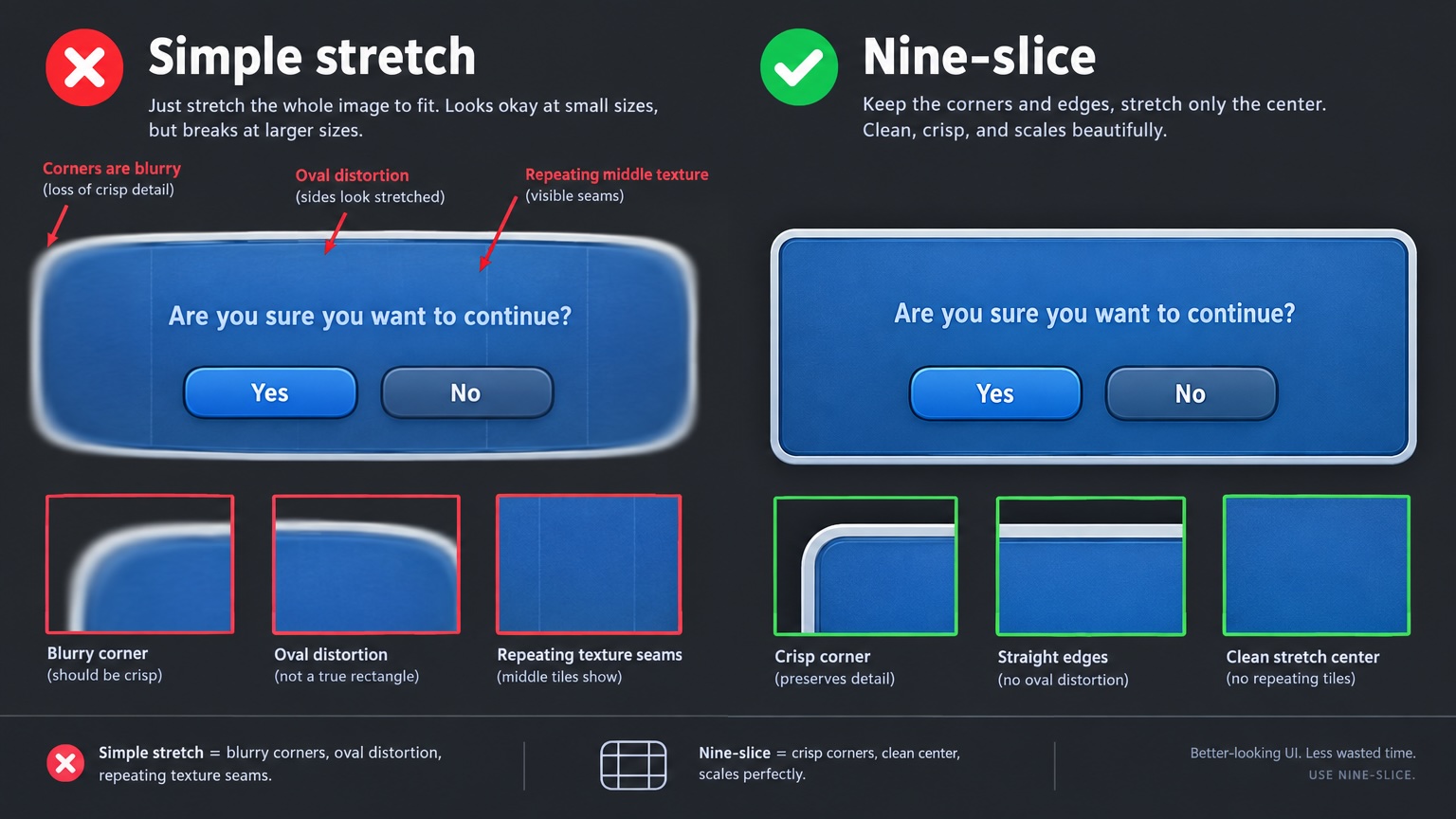
When nine-slice is required vs hard stretch forbidden
| Asset type | Do | Do not |
|---|---|---|
| Dialog / settings panel bg | Nine-slice + content padding | Single Simple sprite full bleed |
| Input / bar containers | Nine-slice or L/R cap + center repeat | Squash height without art rules |
| Primary buttons (fixed size) | Fixed sprite or nine-slice + min width | Infinite wide rounded button as one stretch |
| Icons, avatars, skill frames | Fixed size, no nine-slice | Merge with panel bg into one stretch image |
| Full-screen bg (no framed box) | Full image or tile strategy in spec | Reuse panel borders on full bleed |
Rule: If width or height changes with resolution, copy, or list content and corners must keep shape → nine-slice or engine equivalent. Fixed-size controls → fixed sprite + layout constraints.
Figma / PSD handoff marks (tick list)
| # | Check | Pass standard |
|---|---|---|
| 1 | Stretch layer separate from decor / icons / text | Panel bg reskin + slice; icons not scaled with bg |
| 2 | Border / cap inset in px (four sides) | Matches @1x or team export scale in delivery notes |
| 3 | Fixed export scale (@1x/@2x or 1080 baseline) | Engineering does not guess border math |
| 4 | Corner radius outside stretch region or spec allows non-stretch corners | No “corners turn into capsules” pass |
| 5 | Stretch region tile-friendly or solid | Center repeat without obvious misalignment |
| 6 | Semantic names | e.g. Panel_Shop_9s, Input_Field_9s |
| 7 | Multi-state (normal / disabled) same border | Insets match; only color/skin changes |
| 8 | PSD slice or Figma export notes transparent padding | Do not count shadow in border unless spec says so |
| 9 | Deliver with handoff item 5 button states | Do not patch missing states with wrong 9s art |
| 10 | Event reskin changes art only, border unchanged | See reskin spec |
Figma: put cap inset in component docs when using resizable frames or slice plugins. PSD: align slices with PSD to Unity in 5 minutes.
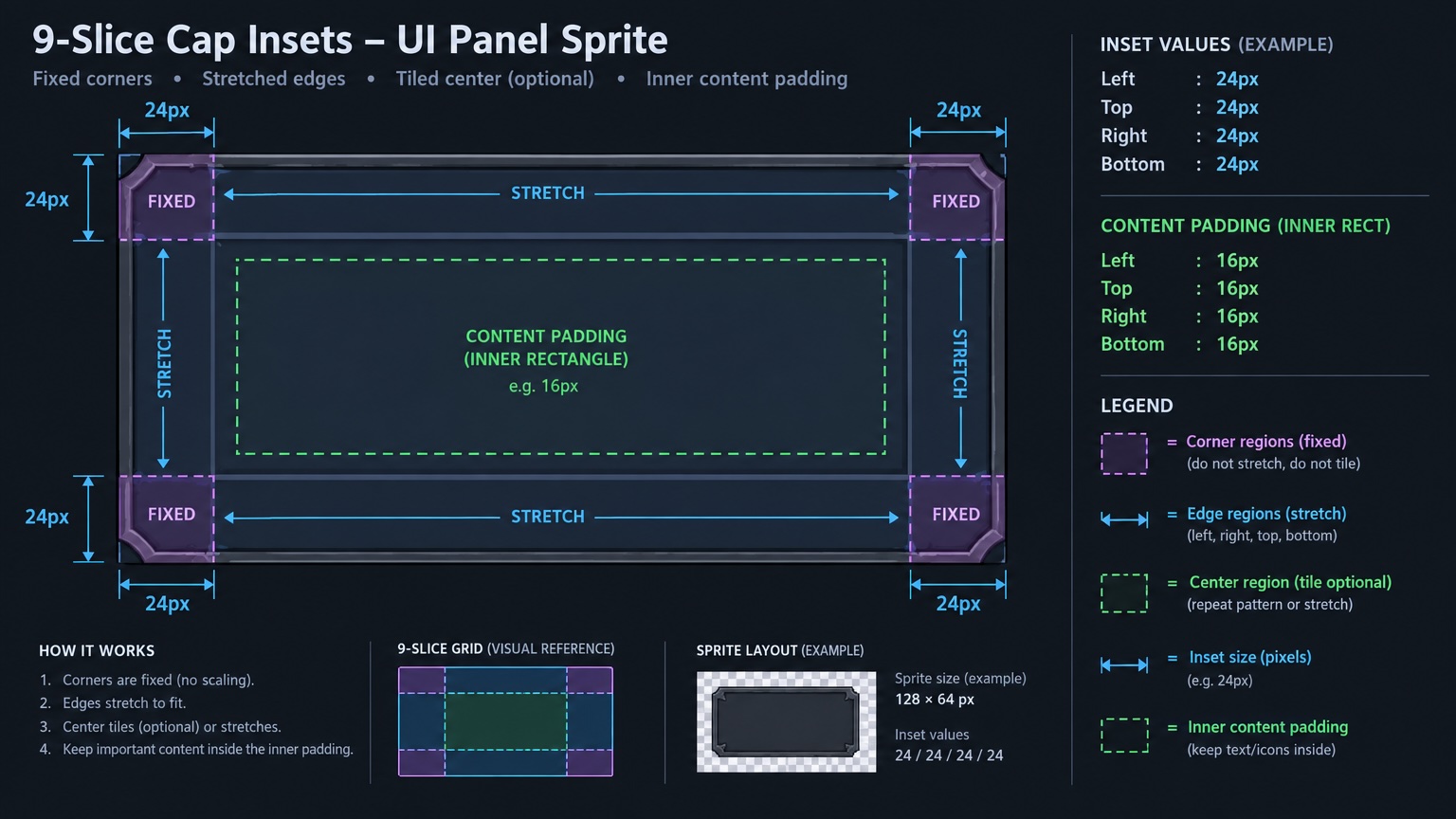
Three engines: components and acceptance
| Item | Unity UGUI | Godot 4 Control | Cocos UI |
|---|---|---|---|
| Component | Image → Sliced / Tiled | StyleBoxTexture (patch margin) | Sprite nine-slice / Sliced |
| Border source | Sprite Editor Border (L/T/R/B px) | content_margin / patch | Cap insets (LTRB) |
| Content area | RectTransform + child padding | MarginContainer + Theme | Widget / layout padding |
| Typical fail | Simple misuse; wrong-scale border | Patch vs texture size mismatch | Atlas rotation breaks inset |
| Pass | At 150% / 200% width: sharp corners, clean center | Same; Theme preview matches Play | Same; device spot-check long list |
Unity Editor acceptance (map to other engines):
- Set Prefab
Imageto Sliced with borders matching design. - Drag panel RectTransform to min and max design widths.
- Compare corners, edges, and center to Figma/PSD capture.
- If Play mode OK → one device pass per pre-ship checklist.
Full-screen concept: canvas split and re-export
With PNG or AI full-screen art only, border cannot be inferred. Path: VberAI Studio (AI Studio, ≠ Google AI Studio) in-place split → mark scalable panels → export Prefab (deterministic, not LLM YAML).
| Step | Action | Acceptance |
|---|---|---|
| 1 | Full screen on canvas; split Panel_* and fixed icons | Named hierarchy |
| 2 | Confirm panel 9-slice intent on canvas or before export | Owner for inset documented |
| 3 | Export Unity / Godot / Cocos Prefab | Sliced QA per table above |
| 4 | After reskin / locales, full-tree re-export | If border spec unchanged, insets unchanged |
Layered Figma/PSD: prefer Figma → Unity or PSD to UGUI, then minor border tweaks in engine—avoid re-exporting 20 loose PNGs each event.
Fix routing
| Symptom | Likely cause | Action | Owner |
|---|---|---|---|
| Blurry corners | Simple scale on whole image | Sliced + correct border; design adds inset mark | Engineering + Design |
| Center seam / repeat blocks | inset off 1–2px; scale mismatch | Match design px; reimport sprite | Engineering |
| Corners stretch oval | Art should not nine-slice | Fixed size or new corner art | Design |
| Border changes after reskin | New art size or padding | Lock canvas size in reskin spec; re-QA after reskin | Design |
| List row bg deforms | Row bg stretched like full panel | Row-specific 9s or fixed height | Design |
| Fail only at some resolution | Canvas Scaler non-integer scale | Engine checklist Anchor/Scaler | Engineering |
Rule: If border ≠ design → fix marks or sprite source first, then Prefab. Inspector-only fixes without updating delivery → lost on next export.
vs “PNG pack only” handoff
| Approach | Fits | Does not fit |
|---|---|---|
| Manual export + engineering fills border | Few panels, demo | Frequent reskin, many screens |
| Figma/PSD + VberAI Studio structured export | Multi-screen, multi-engine, events | Replacing inset marks and QA |
| Temporary Sliced in engine | Hotfix one screen | Long-term without design source |
Recommended: design inset marks → structured Prefab export → Unity Editor Sliced at two widths → MCP for logic. Raycast and binding: engine + MCP checklist.
FAQ
Can rounded panels use nine-slice?
Yes, but insets must sit on straight stretch edges; corners stay in non-stretch corner tiles. If corner radius grows with panel size → fail; fix art or cap max size.
Do shadows count in the border?
Product spec decides. If shadow does not stretch, split layers or mark inset on the solid rect without outer glow.
Tiled vs Sliced?
Sliced for framed panels; Tiled (or tile-friendly center art) for repeating middle texture. Write in spec—do not leave engineering to guess.
Separate slices for Godot / Cocos?
One inset semantics; switch export target via canvas multi-engine export and verify patch/cap per table.
Does VberAI Studio auto-fill borders?
Depends on export and assets; acceptance is always engine Sliced/StyleBox. No inset in design → engineering sets borders in Editor and records in spec.
Is VberAI Studio the same as Google AI Studio?
No. See comparison.
Keep reading
More guides you might like
Free Background Removal in VberAI: Glow / VFX / Semi-Transparent Cutouts with PNG + Alpha
VberAI AI Super Matting has three modes: free matting for solid-color and game glow FX, AI background removal for complex scenes up to 4096×4096, and Super AI matting for hair, semi-transparent edges, and shadows—with transparent PNG plus Alpha.
- vberai
- ai-super-matting
- matting
- super-matting
Cocos MCP Connection Troubleshooting: Cursor Doesn’t Show cocos-creator
Symptom-based fixes for VberAI Cocos Creator 2.x / 3.x MCP: extension missing, activation failure, server not running, port conflicts, Cursor MCP not written or needs reload—plus a checklist and localhost verification.
- cocos
- cocos-creator
- mcp
- cursor
Game UI Design: Traditional Workflow vs AI Art + VberAI Studio In-Place Split
Compare PS/Figma hand slicing with VberAI Studio: import or AI-generate UI, auto split layers, export layered PSD or image sets. Effects, steps, and demo videos.
- game-ui-design
- game-ui-designer-flow
- ui-slicing
- AIGC